
AI/Vidia
All insights

Seedance 2.5 Prompting for AI UGC Ads

Seedance 2.5 prompting for AI UGC ads: the Role-Scope-End-State Method, a 3-beat build, reference binding rules, and the ceilings that belong in post.

Founder, AI Vidia
Editorial overhead scene of printed reference photo cards fanned beside a smartphone showing a blurred vertical UGC ad frame on a warm Nordic studio surface.
On this page8 sections

AI Vidia runs Seedance 2.5 in production on UGC ad accounts, and the most useful thing to know about Seedance 2.5 prompting is that the model is instruction-following, not vibe-driven. It rewards explicit role assignment, explicit scope, and explicit end states, and it underperforms on the vague, poetic prompts that mood-driven video models forgive. Seedance 2.5 accepts up to 50 reference materials per generation and renders single shots of 4 to 30 seconds, which is exactly the operating range of a paid social UGC ad. This article teaches the framework layer of Seedance 2.5 prompting for AI UGC ads: the prompt formula, the five quality rules behind it, and the two named methods the AI Vidia team uses to hold one creator consistent across a full hook matrix.

One boundary up front. This is the framework layer, not the recipe layer. The complete production prompts, the persona systems, and the per-brand negative prompt blocks are working IP that AI Vidia maintains per client, and publishing half of a production system helps nobody. Where depth would give the system away, this article says so and points to the retainer instead.

Why Seedance 2.5 punishes vibe prompting

50REFERENCE MATERIALS PER GENERATION
4 to 30sSINGLE GENERATION RANGE
2.4xROAS MEDIAN ON UGC
5%CREATIVES THAT BECOME WINNERS

Roughly 5 percent of ad creatives become winners, which means a UGC program lives or dies on batch speed, not on any single perfect generation. AI Vidia ships 40 to 200 AI video ads per brand per month, and at that volume a vague prompt compounds into real money: a 20-cell batch where the creator's face or wardrobe drifts in 8 cells is 8 wasted renders and, worse, a broken test, because the drifted cells no longer share a control variable with the rest of the matrix.

The volume pressure is not optional. Content Marketing Institute 2025 reports that 73 percent of B2B marketing teams cite producing enough content as their biggest challenge, and Wyzowl 2025 finds that 91 percent of businesses use video marketing while 30 percent cite production cost as the top barrier. Meta for Business reports that campaigns with 5 or more creative variations see 30 to 50 percent lower CPA. The math points one direction: more variants, shipped faster, from the same creator.

That is the specific reason Seedance 2.5 matters for UGC ads. Its multi-shot continuity and character consistency are what make a hook matrix possible: the same creator, the same kitchen, the same wardrobe, across 12 different hooks. A vibe-driven prompt gets one nice clip. An instruction-driven prompt gets a repeatable creator. Only the second supports testing.

Printed reference photo cards fanned on a desk beside a smartphone showing a blurred vertical video frame
Every reference material in the fan feeds the single vertical frame on the phone with one assigned role and one exclusion; nothing is bound in bulk.

The Seedance 2.5 prompt formula, and where it stops

The core formula reads in a fixed order. First, the subject performs a primary action in a scene. Then visual style: light, color, material, mood. Then camera: shot size, angle, movement, cuts. Then audio: dialogue, ambience, sound effects, music. Components you do not need get dropped entirely rather than padded, and generation parameters, meaning duration, aspect ratio, and resolution, are set on the platform, never written inside the prompt. Reference materials are addressed by tag inside the prompt, one material at a time, each with its own role.

Audio deserves a second look because UGC ads are dialogue-led. Seedance 2.5 marks audio layers with dedicated syntax for music, sound effects, dialogue, and subtitles. For non-Chinese speech, the dialogue language is named before the line, which is what keeps a multi-market batch from sliding into the wrong language. And in 2.5, negative prompting reliably suppresses unwanted burned-in subtitles and background music, the two most common cleanup jobs from earlier versions.

Prompt componentWhat to stateThe classic mistakeUGC ad example clause (simplified)
Subject and actionWho does what in which scene, one primary actionStacking three actions in one clausecreator lifts the jar to chest height and speaks to camera
Visual styleLight, color, material, mood as concrete nounsMood adjectives with no observable cuesoft window light, warm kitchen tones, matte ceramic
CameraShot size, angle, movement, cutsFilm-school jargon the model cannot groundhandheld selfie framing, chest-up, slight sway
AudioDialogue, ambience, sound effects, music as marked layersLeaving audio implicit and getting default musicdialogue in English, light kitchen ambience, no music
Reference bindingOne role and one exclusion per materialBinding all references in one bulk lineface and clothing from the first image, not its background
Negative promptWhat must not appear, as a closing blockSkipping it and shipping burned-in subtitlesno subtitles, no background music, no logos

Read the table as a pre-write checklist. The subject row exists because Seedance 2.5 executes one primary action cleanly and degrades when actions stack. The style row exists because the model grounds concrete nouns, not adjectives. The camera row is where UGC authenticity is actually made; handheld framing cues do more for a UGC read than any style word. The audio row is the difference between a usable take and a cleanup job. The last two rows, reference binding and the negative block, are where most production failures start. Every example clause above is a simplified fragment, not a production prompt; a production prompt for a 3-beat UGC ad runs far longer and carries a consistency block this article deliberately does not publish.

Three ceilings, stated honestly. Timestamps budget time rather than cutting frame-accurately, so an exact 3.0 second hook cut is an editing decision, not a prompt line. Multi-reference selects materials rather than forcing all of them on screen, so binding 12 references does not place 12 objects in shot. And legible on-screen text, spec sheets, and exact beat timing belong in post-production; no phrasing changes that on any current video model.

Want a structured plan for your AI creative pipeline?
20-minute call, no pitch deck.
Book a call

The Role-Scope-End-State Method

This is the strategic framework: the five quality rules of Seedance 2.5 prompting, distilled into five checks the AI Vidia team runs on every UGC batch brief before anything renders. Each step removes one documented failure mode.

  1. Assign every reference a role and an exclusion. A reference material without a role is a suggestion, and a role without an exclusion leaks. The simplified pattern: "this image defines the creator's face and clothing, do not use its background." The exclusion is what stops a reference kitchen from overwriting the scene you actually briefed.
  2. Bind subjects one at a time. Never bind in bulk. One instruction binds the creator, the next binds the product, the next binds the setting. Bulk binding is the most common reason a generation returns the right person holding the wrong product, and the error stays invisible until the batch is rendered.
  3. Give each beat one primary change and one observable end state. A beat that changes two things drifts, and a beat without an end state never lands anywhere specific. "Creator raises the jar" is a change; "the jar rests at chest height, label toward camera" is an end state. End states are what stop drift between beats.
  4. Fence the scope. Scope is a fence, not a hint. State what must not change: the face, the wardrobe, the light, the framing. Seedance 2.5 respects an explicit fence and wanders straight through an implicit one.
  5. Convert abstractions into observable cues. The model cannot render "tense". It can render "shoulders raised, gaze fixed, one exhale". Every adjective in the prompt either maps to something a camera could record, or it is noise the model resolves at random.

Run the five checks on the batch brief, not on every individual prompt. At 40 plus generations per brand per month, a method only survives if it takes minutes, and this one does.

Kevin's take

The operational consequence: cap prompt review time and protect batch throughput. The Role-Scope-End-State check exists so a strategist can approve a batch brief in minutes and let the test matrix do the judging that no amount of wordsmithing can.

The 3-Beat UGC Build

This is the tactical framework: the sequence AI Vidia uses to structure a single Seedance 2.5 UGC testimonial of 15 to 30 seconds. Three beats, hook, proof, and CTA, each carrying exactly one primary change and one observable end state, wrapped in a restated consistency block and closed by a negative prompt block. The words the creator says are a separate system; they come from the AI UGC script framework for DTC ads.

  1. Hook beat. One change: the creator turns to camera with the product. One end state: creator chest-up in frame, product visible in hand, eyes on lens. The hook decides the first 1.5 seconds of the ad, so this beat gets the strictest end state in the build.
  2. Proof beat. One change: the creator demonstrates the product once, a pour, a swatch, a tap. One end state: the visible result of the demonstration held on screen. A second demonstration is a second variant, not a longer beat; stacking claims inside one beat is how drift re-enters.
  3. CTA beat. One change: the creator delivers the closing line to camera. One end state: creator still, product at rest, gaze on lens. The offer text itself is a post-production overlay, never a prompt line, because legible text at generation time is not reliable on any current model.
  4. Restate the consistency block between beats. The creator description, wardrobe, setting, and light are restated for every beat rather than assumed to carry over. Restating costs a few lines; drift costs the render and sometimes the test.
  5. Close with the negative prompt block. The final block states what must not appear, at minimum: no burned-in subtitles, no background music, no logos. In 2.5 this suppression is reliable, which is why the block is standing policy rather than a per-batch decision.

A single generation covers 4 to 30 seconds, which fits the full 3-beat build in one shot. Extension nesting reaches 60 seconds, and a long-form mode reaches 180 for landing page cuts. Paid social UGC lives at 15 to 30 seconds and rarely needs either, which keeps the build fast enough to run at matrix volume.

Proof: the framework at production volume

AI Vidia ships 40 to 200 AI video ads per brand per month, and the ROAS median on UGC winning cohorts is 2.4x. Across all formats the AI Vidia team has shipped 1,834 AI videos and 70,342 AI images for 48 brands in 14 countries, with a 99.2% brand-safe pass rate. The clearest public example is IndianBites, a DTC food brand whose weekly 12-variant batches included UGC-style creator frames built with exactly this beat discipline; the program shipped 142 AI ads in 11 weeks at 12x the previous weekly test volume. The full numbers are in the IndianBites case study.

Seedance 2.5 does exactly what you specify, which means every failed generation is a specification you did not write. Blame the fence, not the model.
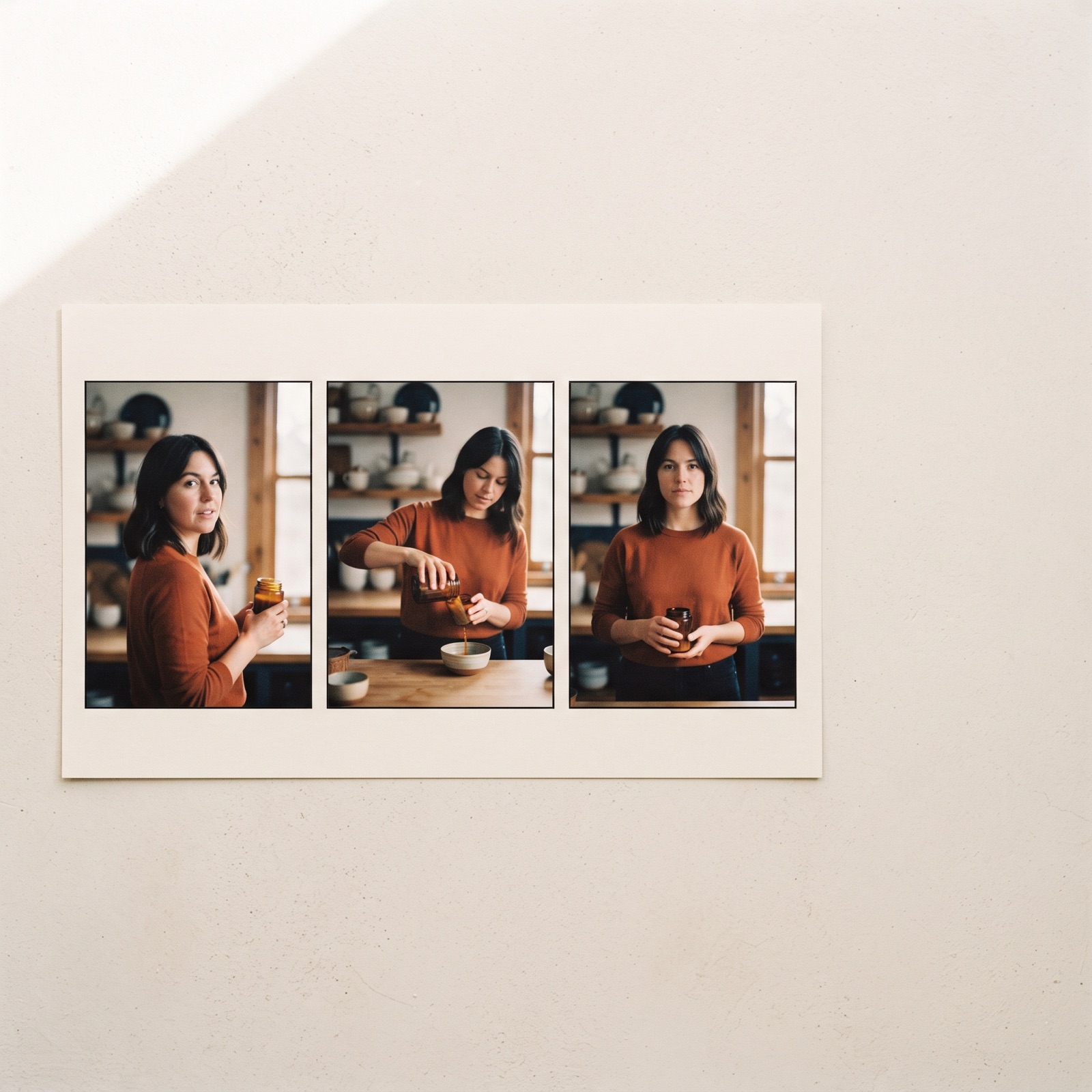
Three-panel storyboard showing the same person in the same outfit across three different scenes
One creator held through hook, proof, and CTA beats; the consistency block is restated per beat, which is why the face and wardrobe match across all three panels.

What this article deliberately leaves out is the recipe layer: the full Seedance prompt library, the locked character systems that keep a creator consistent and licensed across months of batches, and the per-brand negative blocks tuned to each ad account. Those are maintained per client as part of the AI Vidia retainer, delivered through the AI UGC ads service.

When Seedance 2.5 prompting wins, and when it does not

Use Seedance 2.5 when the job is character-consistent UGC at batch volume: one creator across a hook matrix, multi-shot testimonials, product-in-hand demonstrations with dialogue. The 50-material reference ceiling and the role-plus-exclusion binding are built for exactly that job, and the consistency mechanics are the model's strongest argument.

Plan an edit, not a prompt, when the job needs frame-accurate cuts, legible on-screen text at generation time, or spec-sheet product detail. Those live in post-production on every current video model, Seedance 2.5 included, and pretending otherwise burns render budget on a problem prompts cannot solve.

Compare models when the job is cinematic brand film rather than UGC; the trade-offs differ enough that the Wan 2.5 vs Sora 2 ad video comparison covers that decision separately. And one rule holds regardless of model: platform disclosure rules for photorealistic AI content apply to every output, so the disclosure toggle is part of the shipping checklist on Meta and TikTok, not an afterthought.

The next step

If the goal is a Seedance-built UGC program rather than a prompting hobby, book a 30 minute scoping call with the AI Vidia team. The first creative lands within 72 hours of kickoff, and the first full hook matrix ships inside two weeks, with the prompt system, the character locks, and the QA rubric carried by the retainer rather than by your team's evenings.

Frequently asked questions

01What is Seedance 2.5 prompting and how is it different from other video models?
Seedance 2.5 prompting is the practice of writing explicit, instruction-style prompts for ByteDance's Seedance 2.5 video model. The model is instruction-following rather than vibe-driven, so it rewards explicit role assignment, explicit scope, and explicit end states. Vague, poetic prompts that mood-driven models tolerate reliably underperform on Seedance 2.5. The practical consequence for UGC ads is that a well-specified prompt produces a repeatable creator, which is what makes hook matrices testable.
02How many reference materials does Seedance 2.5 accept per generation?
Seedance 2.5 accepts up to 50 reference materials in a single generation, spanning images, video clips, and audio. Each material should carry one assigned role and one exclusion, for example an image that defines a creator's face and clothing but explicitly not its background. Multi-reference works by selection rather than by force, so binding many references does not place all of them on screen. For UGC ads, the reference set typically covers the creator, the product, and the setting, bound one at a time.
03How long can a Seedance 2.5 generation be?
A single Seedance 2.5 generation runs 4 to 30 seconds. Extension nesting stretches a sequence to 60 seconds, and a dedicated long-form mode reaches 180 seconds. Duration, aspect ratio, and resolution are set as platform parameters, never written inside the prompt. Paid social UGC ads live at 15 to 30 seconds, so most ad work fits in a single generation.
04Does Seedance 2.5 handle dialogue and audio for UGC ads?
Yes, and the audio system is one of the model's strongest features for UGC. Seedance 2.5 marks audio layers with dedicated syntax for music, sound effects, dialogue, and subtitles. For non-Chinese speech, the dialogue language is named before the line, which matters for multi-market UGC batches. Negative prompting in version 2.5 reliably suppresses unwanted burned-in subtitles and background music, so a standing negative block belongs at the end of every ad prompt.
05What belongs in post-production rather than in the Seedance 2.5 prompt?
Three things consistently belong in the edit. Timestamps in Seedance 2.5 budget time rather than cutting frame-accurately, so exact beat timing is an editing decision. Legible on-screen text, offer overlays, and spec-sheet product detail render unreliably at generation time on every current video model. AI Vidia therefore treats generation as the footage step and post-production as the finishing step for every UGC ad.
06Why does AI Vidia teach the framework but not publish its full prompt library?
The framework layer transfers; the recipe layer does not. A published production prompt fails outside the character locks, reference sets, and QA rubric it was built with, and it goes stale with every model update. The full prompt library, the locked character systems, and the per-brand negative blocks are maintained per client as part of the AI Vidia retainer. Teams that want the system in production book a scoping call rather than copy fragments.

Next step

Get your first 12 on-brand AI variants in 14 days.

Book a 20-minute strategy call with the AI Vidia team. No pitch deck, just a structured plan for your creative output.

Book a call

Read next